Drop a link.
Get the original.
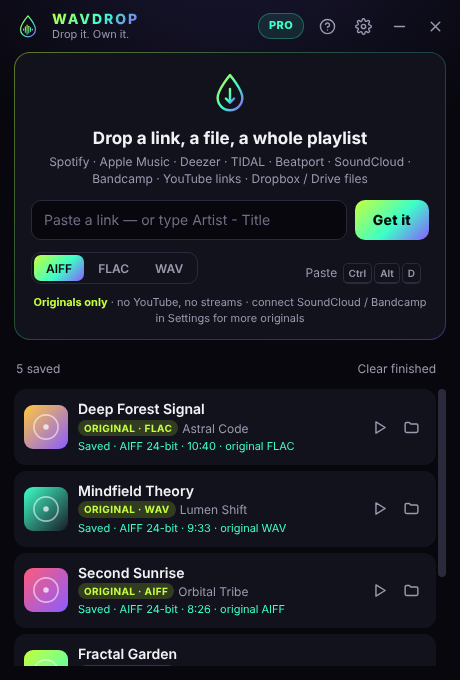
WAVEDROP lives on your desktop as a small glowing drop. Throw a track at it — a Spotify, Apple Music or SoundCloud link, a whole playlist — and it finds the best legal source — a free download the artist offers or a track you bought — checks it's the exact track, and drops it into your crate as AIFF, FLAC or WAV.
No card needed for the trial · Windows 10 & 11 · then from $7.99/month
See it in 8 seconds.
Drag a link onto the drop. WAVEDROP checks it's the exact track, gets the original file, and puts it in your folder.
 Drop it
Three moves. Zero hassle.
No converters, no ten tabs open, no wrong versions in the middle of your set.
Drop it
Drag a link onto the floating drop on your desktop, paste it, or press Ctrl+Alt+D. Tracks, albums and playlists all work.
It finds the original
WAVEDROP reads the exact title, artist and length, then looks for the original file the artist released — or the copy you already bought.
It lands in your crate
Verified, named Artist - Title, tagged with cover art, in the format your software loves. Ready for Rekordbox, Serato or Traktor.
No YouTube rips. No surprises.
Most "downloaders" grab a compressed video stream and dress it up as WAV. WAVEDROP doesn't. It only saves real original files — and tells you honestly when there isn't one.
- Artist originals from SoundCloud — the full-quality WAV, FLAC or AIFF artists choose to share.
- Your Bandcamp purchases — your whole collection in lossless, in one click.
- Direct files — Dropbox and Google Drive links, promo pools, files from your mates.
- No original anywhere? You get a one-click link to buy it on Bandcamp or Beatport — never a fake.
Every match is checked for title, artist, version and length (±4 s) — and measured again after download. Anything that doesn't match is never saved.
Everything a DJ crate needs
Built for people who play offline — and care what's actually in the file.
Paste & drag-and-drop
Drop one link or twenty. Drag a playlist, an album or a SoundCloud set straight onto the drop.
Whole playlists & albums
Spotify playlists and albums, SoundCloud sets — every track is identified and checked one by one.
Multi-source original finder
Looks for the artist's own downloadable original on SoundCloud, your Bandcamp purchases and direct file links.
Verified, never a wrong version
Title, artist, version and length (±4 s) are checked before download — and the file is measured again after.
AIFF, FLAC, WAV or MP3 320
Keeps the original bit depth and sample rate. Lossless originals are copied bit-for-bit.
Tags & cover art
Named Artist - Title with artist, title and artwork embedded — your library looks right on import.
Auto-organized folders
Each playlist or album gets its own folder automatically. Your crate stays clean.
Track lists from text files
Drag a .txt, .csv or .m3u list of songs onto the drop. WAVEDROP works through all of it.
Resume where you left off
Closed WAVEDROP mid-queue? It picks the queue back up next time you open it.
Floats on your desktop
A tiny always-on-top drop with a progress ring. Press Ctrl+Alt+D to grab a copied link from anywhere.
Support inside the app
Write from the Help tab — a real person answers, and the reply appears right in WAVEDROP.
Coming next SOON
Rekordbox / Serato / Traktor playlist sync, Shazam auto-download, a phone bot and a Mac version.
Try it free. Keep it if it earns its place.
Every feature, No card, no catch. After that, pick a plan.
Monthly
- Everything in WAVEDROP
- Unlimited tracks & playlists
- 2 computers
- In-app support
Yearly
- Everything in WAVEDROP
- Unlimited tracks & playlists
- 2 computers
- Priority support
Lifetime
- Everything in WAVEDROP
- All 2.x updates
- 2 computers
- In-app support
Prices in USD. Taxes added at checkout where required. Payments are handled securely by Lemon Squeezy, our reseller. 14-day money-back guarantee.
Questions
Will it download every song on Spotify?
No — and we'd rather tell you now. Spotify, Apple Music, TIDAL and Deezer protect their audio, so WAVEDROP only reads the track's name there. It then looks for the original file the artist made available (for example a free download on SoundCloud) or the copy you bought on Bandcamp. If none exists, it gives you a one-click link to buy it. That's how you end up with a crate you can play anywhere, legally, at full quality.
Does it rip audio from YouTube?
No. YouTube and other video links are only used to read the track's title. WAVEDROP never saves audio from video sites.
Why do I need to sign in to SoundCloud and Bandcamp?
Artists often make their original file downloadable only to signed-in listeners, and your Bandcamp purchases live in your account. You sign in inside WAVEDROP on Bandcamp's and SoundCloud's own pages — we never see or store your password.
Which formats and quality do I get?
AIFF, FLAC or WAV — your choice. WAVEDROP keeps the original bit depth and sample rate. If the original is already lossless and in your format, it's copied bit-for-bit.
Does it work with Rekordbox, Serato and Traktor?
Yes. Files are named Artist - Title with artist, title and cover art embedded (AIFF and FLAC). Point your DJ software at your WAVEDROP folder.
What happens after the free trial?
WAVEDROP asks you to choose a plan. Your files stay yours forever — the trial only limits new downloads.
Mac version?
Windows 10 and 11 today. Mac is on the roadmap — tell us you want it.
Can I get a refund?
Yes — within 14 days of your first payment, no questions asked. See the refund policy.

Your next set deserves the original.
free for friends. Takes a minute to install.
Download WAVEDROP for Windows